The Dark Arts of Device Drivers: Bridging Software and Silicon
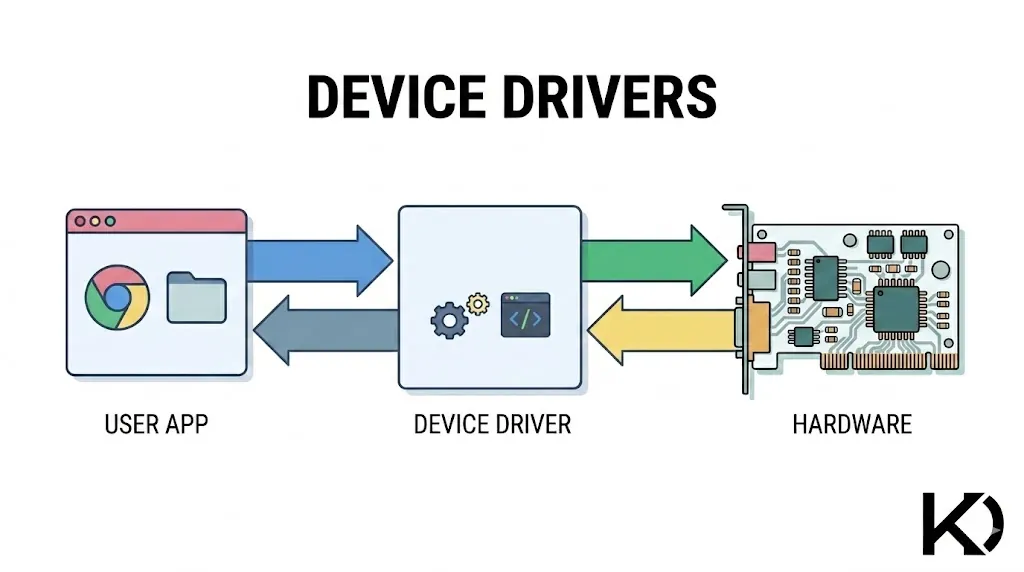
At its core, a device driver is a specialized piece of software that acts as a translator between an operating system (OS) and a hardware device.
Hardware components from massive server GPUs to tiny I2C sensors speak highly specific, proprietary "languages" based on their electrical engineering. The operating system doesn't have the capacity to learn every single hardware language on the market. Instead, it relies on drivers to translate general OS commands into the precise electrical signals and memory writes that a specific piece of hardware understands.
Here is a breakdown of where they sit in a system architecture and how they tie everything together.
Where Drivers Sit in the System Architecture
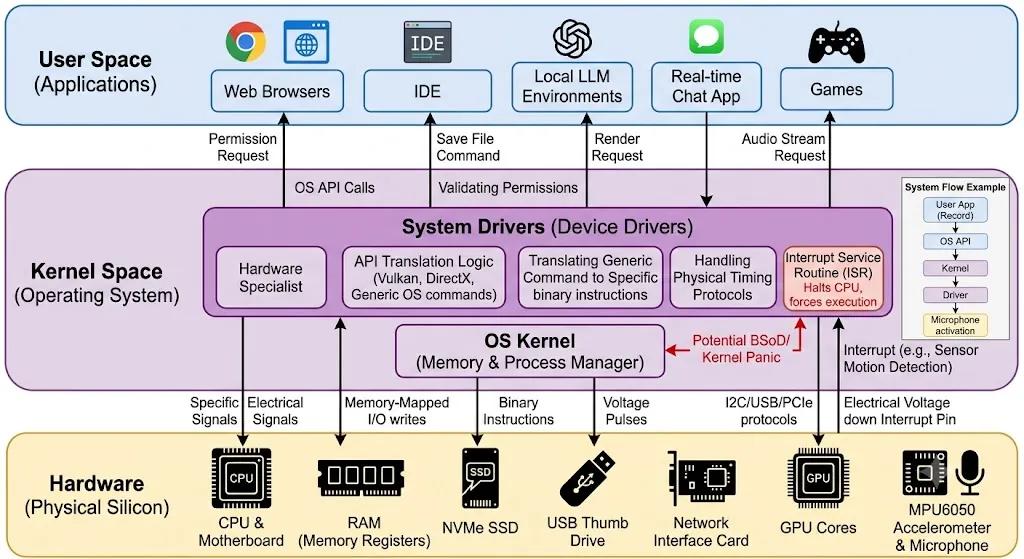
Modern computer systems are divided into layers to maintain security and stability. Drivers usually sit right in the middle, acting as the bridge between the software you interact with and the physical silicon.
1. User Space (The Top Layer)
This is where standard applications live web browsers, local LLM environments, IDEs, and games. Applications in user space cannot talk to hardware directly. If an application needs to use hardware (e.g., a real-time chat app needing the microphone), it must ask the OS for permission.
2. Kernel Space (The Middle Layer)
The Kernel is the core of the operating system. It has absolute control over the system's resources.
Drivers primarily sit inside this Kernel Space. Because they operate at this highly privileged level, they can communicate directly with the motherboard and CPU. This is also why a poorly written driver can crash the entire computer (causing a Blue Screen of Death or a Kernel Panic) if a driver makes a critical error in Kernel Space, the OS cannot protect itself.
3. Hardware (The Bottom Layer)
This is the physical device itself your RAM, storage drives, network interface cards, and peripherals.
How Drivers Relate to the OS and Kernel
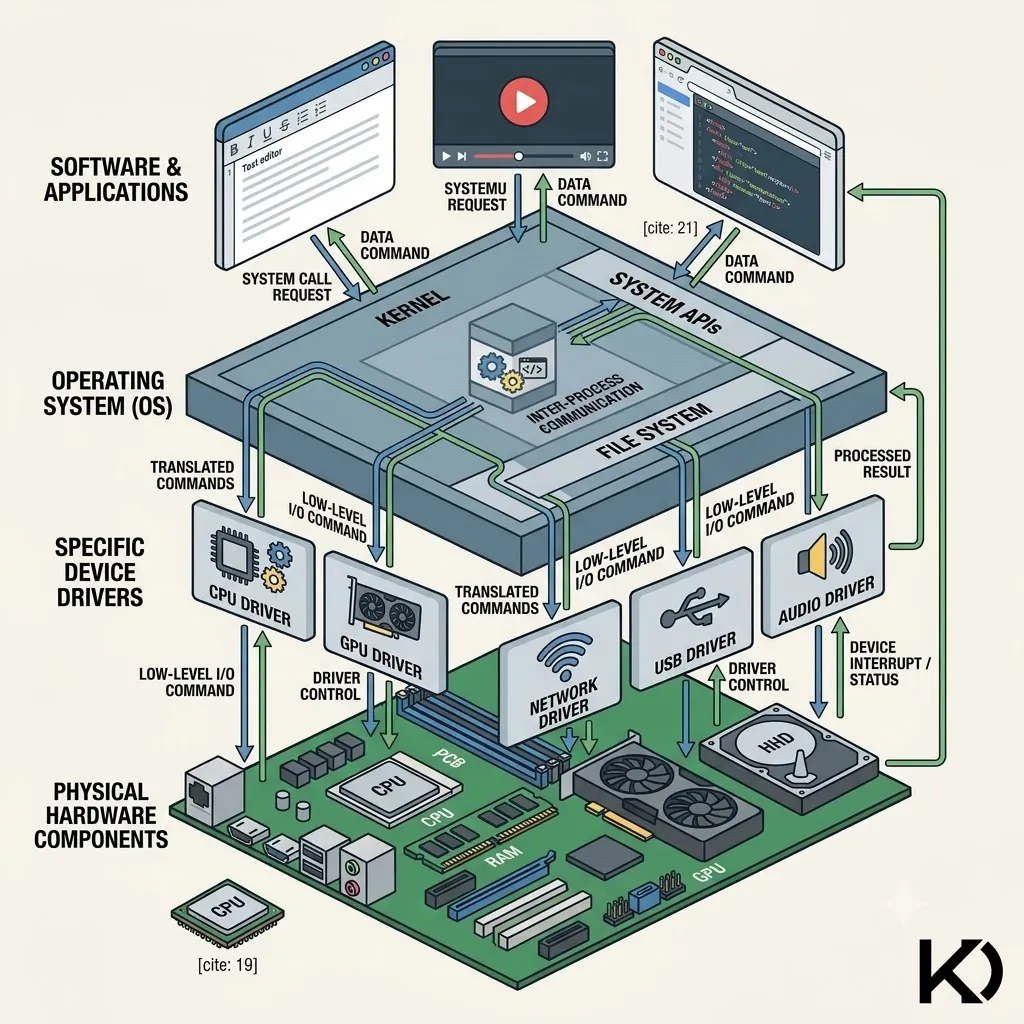
The relationship between the kernel and the driver is like the relationship between a manager and a specialist. Drivers are not separate from the kernel; they are the kernel. An operating system like Linux is essentially just a massive collection of device drivers wrapped around a memory and process manager.
- Standardized APIs: The kernel provides a standard API for general tasks. For example, the kernel knows how to "write data to a disk" or "render a 3D polygon."
- Delegation: When an application tells the kernel to save a file, the kernel doesn't care if you are using an NVMe SSD, an old spinning hard drive, or a USB thumb drive. The kernel simply hands the data to the storage driver and says, "Save this."
- Translation: The driver takes that generic command and translates it into the exact voltage pulses, memory register addresses, and communication protocols required by that specific manufacturer's hardware.
How Drivers Relate to Real Hardware
Real hardware is controlled by manipulating specific memory addresses (registers) and sending data over physical buses (like PCIe, USB, or I2C). The driver is programmed with the exact "map" of these registers.
In high-performance computing: If you are running an AI model or a game, the OS sends the rendering request to the GPU driver. The driver knows the exact microarchitecture of the specific chip whether it's an integrated Radeon 680M or a dedicated NVIDIA Quadro and translates standard API calls (like Vulkan or DirectX) into the specific binary instructions that make the GPU's cores do the math.
In embedded systems: If you are building an IoT device and need to read data from an MPU6050 accelerometer, the driver (often implemented as a low-level library in microcontrollers like an ESP32) handles the precise timing of the I2C clock signals, sends the correct hexadecimal addresses to wake the sensor up, and parses the raw bytes returned into human-readable X/Y/Z coordinates.
The System Flow at a Glance
| Layer | Component | Action Example |
|---|---|---|
| User Space | Application | Clicks "Record" in an audio app. |
| OS API | Audio Subsystem | Routes the audio stream request to the kernel. |
| Kernel Space | The OS Kernel | Validates permissions and calls the driver. |
| Kernel Space | The Driver | Translates the request into specific I2S/USB protocols. |
| Hardware | Microphone | Activates the physical diaphragm and sends digital audio back up the chain. |
The Beautiful Mechanics: Where Math Becomes Electricity
If you write standard software a Flutter app or a Node.js backend you are manipulating abstract concepts: objects, arrays, and strings.
But when you write a driver, your code physically alters electricity. That is the profound beauty of it. Drivers are primarily written in C and Assembly, and they communicate with hardware through two main mechanisms:
1. Memory-Mapped I/O (MMIO)
This is the magic trick of driver development. The CPU tricks the software into thinking a piece of hardware is just a block of standard RAM.
If you are working with an ESP32 microcontroller, for example, the CPU has a specific memory address (like `0x3FF44004`) hardwired to the physical GPIO pins. When your C code writes a binary `1` to that exact memory address, a transistor physically opens on the silicon, and 3.3 Volts of electricity rushes down a copper wire. You aren't just moving data; you are controlling physics with hexadecimal math.
In driver code, you use "bitmasking" (using logical AND/OR operations) to flip specific bits in a single byte of memory without changing the others, fundamentally altering the hardware state.
2. The Power of Interrupts
In normal programming, software runs line-by-line. In driver programming, the hardware can "scream."
If you have an MPU6050 accelerometer wired up, the driver doesn't constantly ask the sensor, "Did we move? Did we move?" That wastes CPU cycles. Instead, when the sensor detects motion, it sends a sudden electrical voltage down a dedicated "Interrupt" pin.
This voltage physically halts the CPU, pauses whatever user application is running, and forces the CPU to immediately execute a specific function in your driver called an Interrupt Service Routine (ISR). It is the hardware asserting dominance over the software.
The Stories and The Builders
Today, massive silicon companies like Intel, AMD, and Broadcom employ thousands of kernel engineers. They have access to secret, 5,000-page proprietary PDF manuals that map out exactly what every memory address does.
But the best stories come from the open-source community, specifically the hackers who write drivers without the manuals.
The Art of "Clean-Room" Reverse Engineering
One of the most famous, ongoing sagas in driver history is the Nouveau project. For years, NVIDIA refused to release open-source drivers or documentation for their GPUs on Linux. They only provided a closed-source, pre-compiled binary.
The open-source community decided to build their own driver from scratch. How do you write a driver for a highly complex GPU without knowing how it works? You spy on it.
The hackers wrote tools (like REnouveau) that let the proprietary NVIDIA driver run, but secretly recorded every single memory address the binary wrote to while rendering a 3D spinning gear. By staring at endless logs of raw hexadecimal data, the developers slowly decoded NVIDIA's secret language figuring out which memory address controlled the fans, which controlled the 3D rendering, and which controlled the clock speed. They reverse-engineered an entire graphics architecture just by watching the footprints it left in memory.
Kavishka Dulshan