How to Use a Raspberry Pi as a WIFI Access Point (Sinhala)
මම මෑතකදී කරපු project එකකදි මට සිද්දවුනා Raspberry pi එකක් WIFI access point එක්ක් විදිහට use කරන්න. කාටම හරි useful වෙයි කියලා හිතලා මං කියන්නම් කොහොමද ඒක ලේසියෙන්ම කරගන්නේ කියලා.
මුලින්ම අපි අපේ Raspberry pi එකට match වෙන Raspberry pi OS එක select කරගෙන SD card එකකට write කරගන්න ඕන. මෙතනදි මං ඒ හැමදේම විස්තර කරන්න යන්නෙ නෑ.
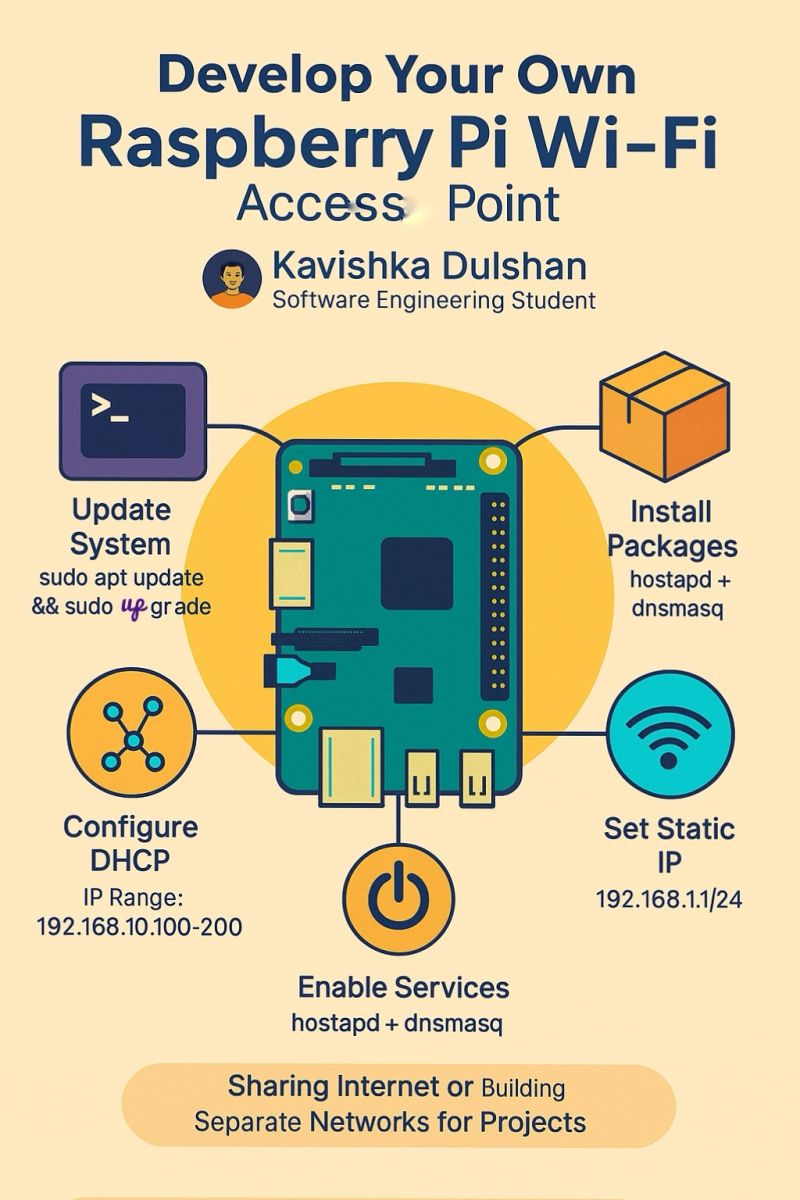
ඊළඟට අපි කරන්න ඕන Raspberry pi එක power on කරලා dnsmaq සහ hostapd කියන packages දෙක install කරගන්න එක. මං ඒවට අදාළ commands පහළින් දානම්. ඊට පස්සෙ අපි කරන්නෙ install කරගත්ත dnsmasq සහ hostapd දෙක අපේ වැඩේට අවශ්ය විදිහට configure කරගන්න එක. ඒ සේරම step by step පහළ තියෙනවා.
මේ විදිහට configuration ටික කරාට පස්සෙ මේවා services විදිහට boot up එකේදිම run වෙන විදිහටත් හදාගන්න ඕනෙ. මොකද නැත්තං හැම වෙලාවෙම display connect කරන් මේවා manually run කරන්න වෙන නිසා.
මෙන්න මේ විදිහට අපිට පුලුවන් අපේ Raspberry pi එක WIFI access point එකක් විදිහට use කරන්න. ඒකට අදාළ සියලු configurations ටික step by step මම පහළ දාලා තියෙනවා.
Step by Step Guide: Raspberry Pi as WIFI access point
Architecture: PC (WiFi) ↔ Raspberry Pi (AP)
Phase 1: Configure Raspberry Pi as Access Point
1. Update System
sudo apt update && sudo apt upgrade -y
2. Install Required Packages
Bash
sudo apt install hostapd dnsmasq -y
3. Configure DHCP (dnsmasq)
Edit the config file:
Bash
sudo nano /etc/dnsmasq.conf
Add these lines:
Code snippet
interface=wlan0
dhcp-range=192.168.10.100,192.168.10.200,255.255.255.0,24h
4. Configure Access Point (hostapd)
Create the config file:
Bash
sudo nano /etc/hostapd/hostapd.conf
Add the following configuration:
Code snippet
interface=wlan0
driver=nl80211
ssid=Your AP's name
hw_mode=g
channel=7
wmm_enabled=0
macaddr_acl=0
auth_algs=1
ignore_broadcast_ssid=0
wpa=2
wpa_passphrase=AP's password
wpa_key_mgmt=WPA-PSK
wpa_pairwise=TKIP
rsn_pairwise=CCMP
5. Set Static IP
Bash
sudo nano /etc/dhcpcd.conf
Add these lines at the end of the file:
Code snippet
interface wlan0
static ip_address=192.168.10.1/24
nohook wpa_supplicant
6. Enable Services
Bash
sudo systemctl unmask hostapd
sudo systemctl enable hostapd dnsmasq
sudo reboot