Relper (Read Helper) - PDF Reading Assistant
A shared-codebase reading assistant that makes digesting English PDFs seamless by providing instant definitions and AI explanations without breaking your reading flow.
Overview
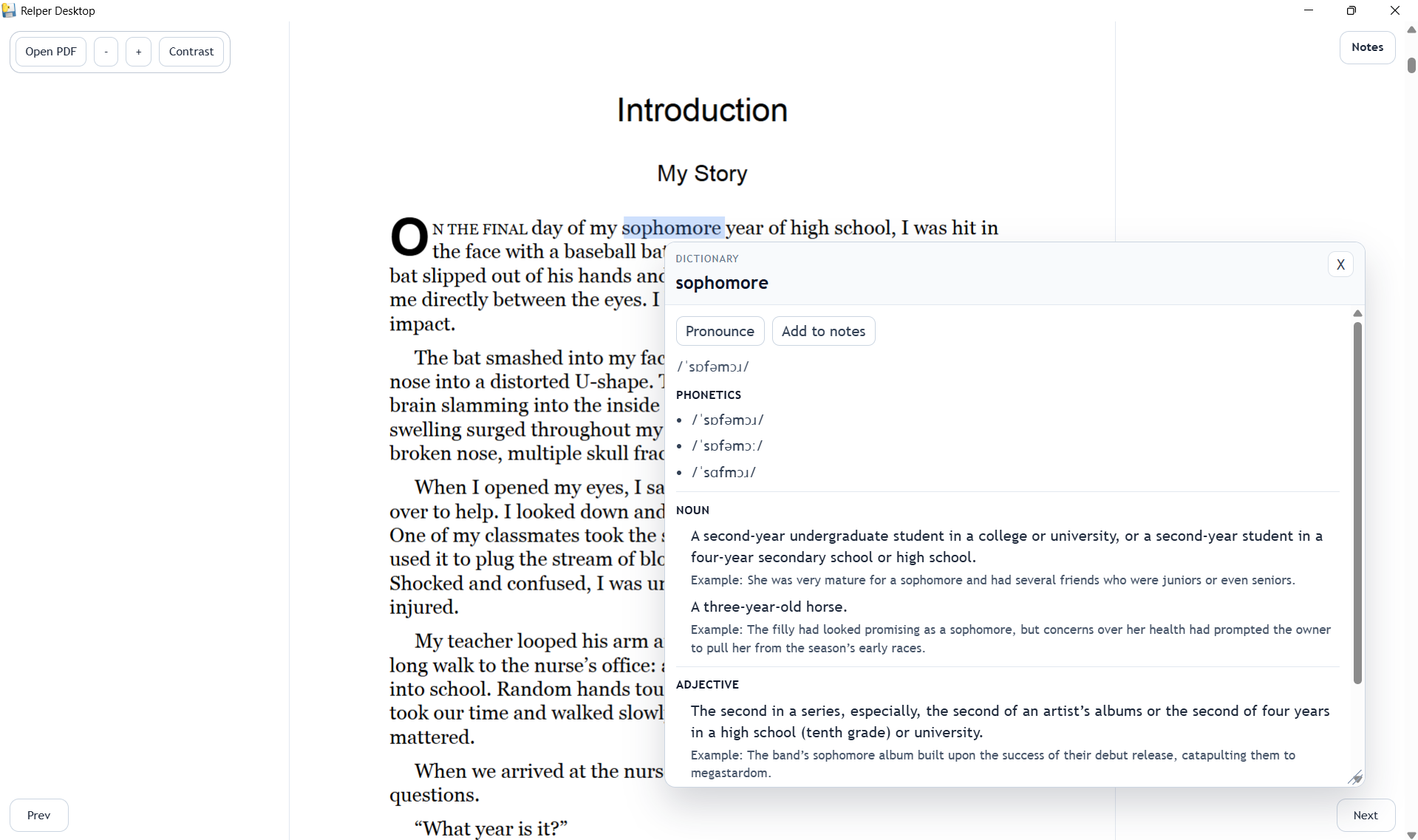
Relper (Read Helper) is an open-source PDF reading assistant built to streamline the reading experience across both Web and Windows Desktop environments. By utilizing a single, shared React codebase wrapped in lightweight native hosts, Relper allows users to open local PDF files, select words for instant dictionary definitions, and highlight phrases for AI-generated explanations.
The Problem It Solves
This application will helpfull for the non native English readers who are struggling to find the meanings or the definitions of unknown words. When we read english books and stuff it make board to find meanings of unknown words from diffrent sources. but this will helpfull to get the definition of the word instantly, there fore it will keep the reader from distraction.
Core Features
- Local PDF Rendering: Open and render PDF files directly on your device using
pdfjs-dist. Documents are processed locally, ensuring your reading materials remain private. - Instant Dictionary Lookups: Select any single word to launch a draggable, resizable popup containing phonetics, definitions, synonyms, and an audio pronunciation player.
- AI Phrase Analysis: Select complex phrases or idioms to get simplified explanations and real-world examples. (Available on Desktop and Android hosts).
- Distraction-Free UI: Includes zoom controls, keyboard shortcuts, page navigation, and a high-contrast mode for accessible reading.
- Per-PDF Notes: Support for isolated word notes saved on a per-document basis.
Open Source & API Integrations
Relper is proudly built for the open-source community, designed to be easily extensible and cost-free to host. To maintain this zero-cost infrastructure, the project leverages powerful open-source and free public API services:
- Dictionary API (
dictionaryapi.dev): Provides comprehensive, ad-free dictionary entries. The app'sdictionaryApi.jsutility normalizes complex nested responses from this API to extract the most relevant definitions, phonetics, and source URLs. - Pollinations AI (
text.pollinations.ai): Powers the phrase explanation feature without requiring users or developers to provide expensive private API keys. The system uses a highly resilient fallback pipeline (aiExplainApi.js) that queriesopenai-fast, falls back toopenai, and eventually routes to a legacy text API to guarantee users always receive an explanation.
Architecture & Tech Stack
The architecture is designed around the "write once, run anywhere" philosophy. A single frontend React implementation dictates the product's behavior, which is then served via thin native wrappers depending on the platform.
| Layer | Technology |
|---|---|
| Frontend Framework | React 19 + Vite 8 |
| PDF Rendering | PDF.js (pdfjs-dist v5.6) |
| Desktop Wrapper | Python, Flask,pywebview |
| Desktop Packaging | PyInstaller + Inno Setup 6 |
How the Desktop App Works
Instead of shipping a heavy Electron binary, Relper Desktop uses a lightweight Python backend.
- The
app.pyscript spins up a local Flask server on a dynamic free port to serve the static Vite build. - It then launches a native operating system window utilizing
pywebview(using the Edge Chromium engine on Windows) directed to that local port. - The build tools (
sync_frontend.ps1,build_exe.ps1) automatically bundle the React static files and compile the Python script into a standalone.exeusing PyInstaller.
Setup & Deployment
Web Development
To run the web reader locally:
# Install dependencies
npm install

# Start Vite dev server
npm run dev