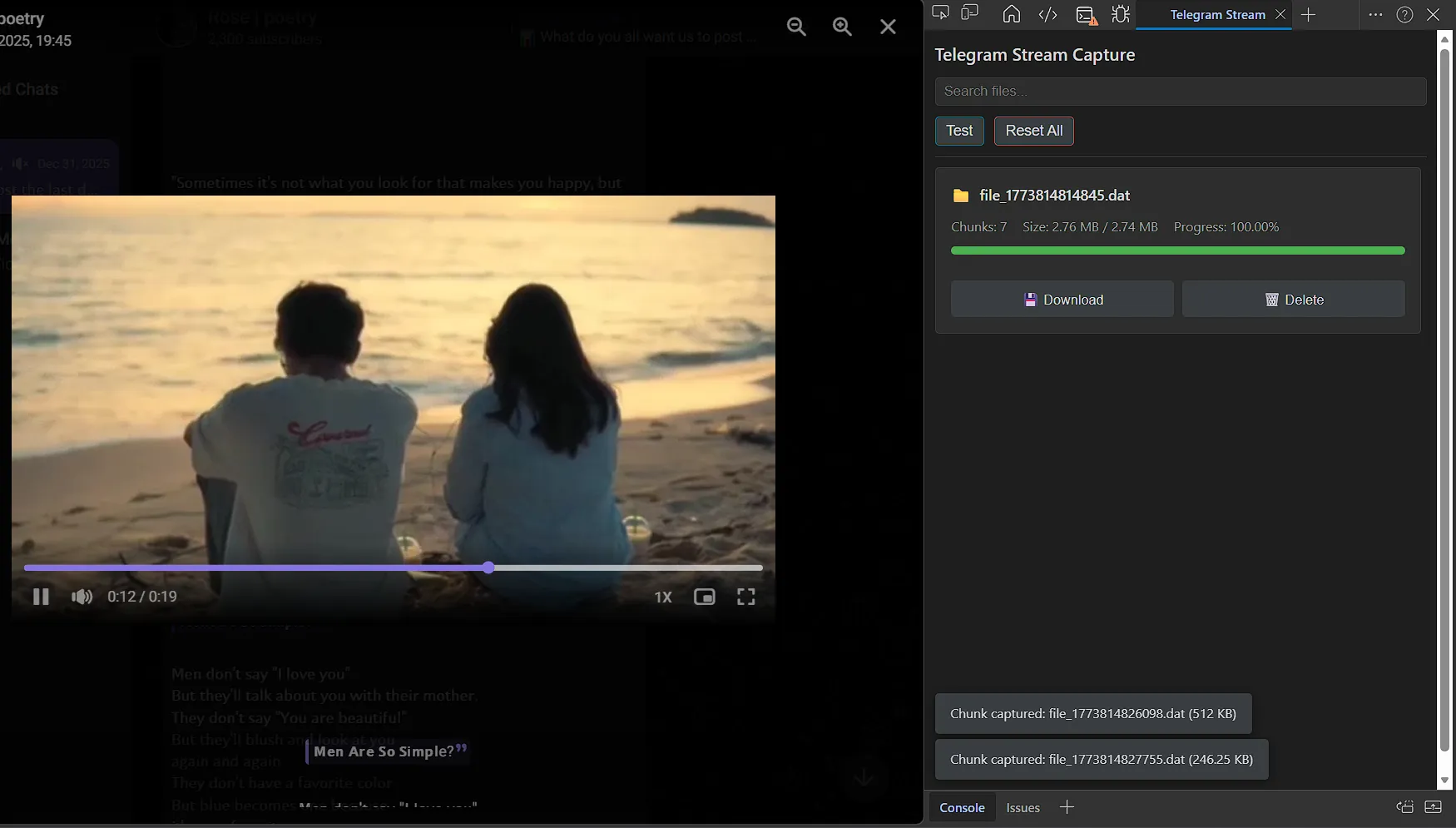
Telegram Restricted Video Downloader
How I built a Chrome DevTools extension to bypass Telegram's download restrictions by capturing and reassembling binary video chunks in real-time.
Overview
This project started with a simple curiosity: How does Telegram Web stream those "restricted" videos that disable the download button?
After spending some time inspecting the network traffic in Chrome DevTools, I noticed a clear pattern. The videos aren't sent as a single file; instead, they arrive in binary chunks via progressive download requests.
Before building the final tool, I had to verify my theory. I manually extracted the Base64 data from the network logs and used Python scripts and web-based decoders to decode and stitch the chunks together. Once I confirmed I could successfully play the reassembled video, I knew I could automate the process. To do the heavy lifting in real time, I built a custom Chrome DevTools Extension that captures, reassembles, and downloads these restricted files directly from the browser.
Tech Stack
| Layer | Technology |
|---|---|
| Language | JavaScript (ES6+) |
| Framework | Chrome Extensions API (Manifest V3) |
| Prototyping | Python (for initial logic validation & testing) |
| Data Handling | Binary Data Manipulation (Uint8Array, Blob) |
| UI/Styling | HTML5, CSS3 (Custom DevTools Panel) |
Features
- Network Interception: The extension listens to network requests matching Telegram's progressive document pattern (
/progressive/document) using thechrome.devtools.networkAPI. - Chunk Parsing: Automatically reads the
Content-Rangeheader (e.g.,bytes 0-524287/1048576) to determine exactly where each piece fits into the complete file. - Binary Decoding: Converts the encoded response content by using
atob()to decode the Base64 strings into raw binary, storing them safely inUint8Arraybuffers. - Byte-Perfect Reassembly: Solves the tricky problem of out-of-order chunks by sorting them by their start byte and merging them into a single
Uint8Arrayusing the.set()method to ensure absolute byte-perfect integrity. - One-Click Export: Converts the merged binary array into a
Bloband triggers a native browser download, effectively making the "restricted" button click itself. - Real-Time UI: Features a clean DevTools panel that tracks real-time download progress, groups chunks by file automatically, and alerts you if gaps are detected in the byte sequence.
Lessons Learned
Binary data handling in JavaScript requires precision. The trickiest part of this build was the reassembly. Concatenating Base64 strings directly easily corrupts files. By dropping down to raw bytes using Uint8Array.set(), I could efficiently place each chunk at its exact offset, preventing memory issues and file corruption.
Browser APIs are incredibly powerful. Utilizing chrome.devtools.network opened my eyes to how deeply extensions can interact with page traffic. It was a great exercise in understanding HTTP ranges and exactly how modern web apps stream large media files.